There's several dozen NAM approved Transit Stations included as optional components of the NAM 36 installer.
Many NAM stations service multiple networks, so the broad types of NAM stations relate to how they are built/used:
- Proximity-based stations, are simply plopped adjacent to the networks they service.
- Avenue overhanging stations are composed of a station piece and an "other side" piece, to link the mass transit network on both sides of the avenue.
- Orthogonal raised (or ground) stations, designed to sit inside the orthogonal network it services, activated by drawing the network through the station.
- Diagonal raised stations, being a two tile plop with overhang, designed to sit inside a two-tile piece of the diagonal network, activated by drawing the network through the two tiles.
- Dual networking stations, a transit lot that resembles a puzzle piece, replacing a section of street, road, or avenue, as found among the GLR and RTMT stations.
Copied to: https://www.nam.sc4devotion.com/index.php?title=Transit_Stations
There are also families of stations that share a similar appearance or BAT style, based on the content creator.
- BriPizza has made distinctive proximity-based stations with irregular overhanging lots.
- RaphaelNinja created the shiny silver Ninja Boulevards.
- Morifari's creations can be spotted by the distinctive orange benches, for the comfort of waiting commuters, and also includes the "Victorian" stations, too.
- Xyloxadoria does the long gracefully arched (1x6) blue glass stations.
- The "Modern" family of stations have the rectangular gray concrete, steel and glass structure, the only family of stations with both single-height (15m) and double-height (30m) buildings, which were all created by Xyloxadoria, but have quite a different look from the arched blue glass stations.
- Brenda_Xne did the Modern GLR Station and Modern Monorail and Bullet Train Station, which look quite different from Xyloxadoria's "Modern" family of stations.
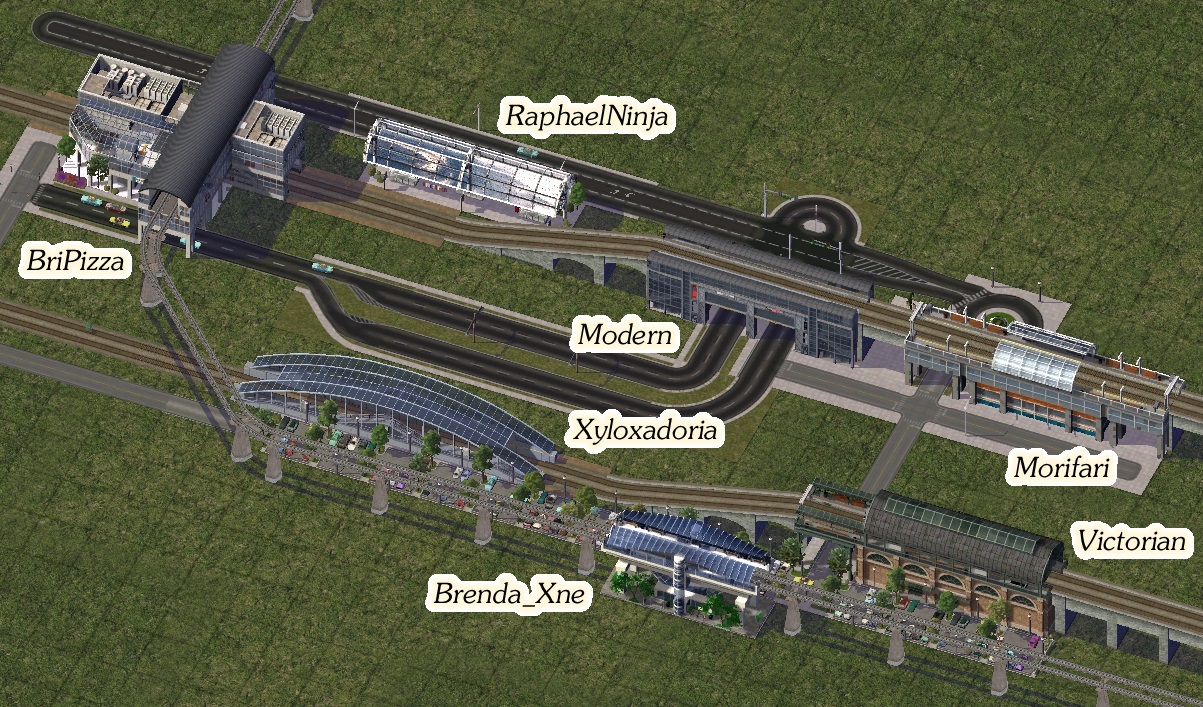
Transit Station Summary
Comparison Table (NAM 36)
Click on the arrows in the column headers to sort. This is a list of the optional Transit Stations available in the NAM 36 installer:
- Looking for the lowest monthly cost for your budget? Click on the Budget header.
- Looking for stations with a similar visual style? Click on the Family header.
- Looking to shortlist stations with built-in car parking for your residential zones? Click twice on the Car Park header.
- Looking for a list of Monorail/HSR enabled stations? Click twice on the Monorail column header.
- Looking for just the station to fit in a 1x3 space between avenue and street, to provide bus and subway access at both ends of the station? Click on the Size column header.
# |
Menu Name |
BAT Family |
Type |
Cap 000's |
Budget |
Size (plop) |
Bus |
Car |
Tram (GLR) |
El-Rail |
Sub |
Rail |
Freight |
Mono |
|---|---|---|---|---|---|---|---|---|---|---|---|---|---|---|
›15 |
Bus Stop |
Maxis |
Proximity |
17 |
5.00 |
1x1 |
B |
- |
- |
- |
- |
- |
- |
- |
› |
Subway Station |
Maxis |
Proximity |
24 |
20.00 |
1x1 |
- |
- |
- |
- |
S |
- |
- |
- |
»13 |
Passenger Train Station |
Maxis |
Proximity |
24 |
20.00 |
2x3 |
- |
P |
- |
- |
- |
R |
- |
- |
» |
Freight Train Station |
Maxis |
Proximity |
30 |
10.00 |
2x3 |
- |
- |
- |
- |
- |
- |
F |
- |
› |
Elevated Rail Station |
Maxis |
Orth L2 |
30 |
20.00 |
1x3 |
- |
- |
- |
E |
- |
- |
- |
- |
» |
Monorail Station |
Maxis |
Orth L2 |
45 |
20.00 |
1x3 |
- |
- |
- |
- |
- |
- |
- |
M |
› |
HSRP Transit Hub |
Industrial |
Orth L0 |
150 |
300.00 |
6x8 |
B |
- |
- |
E |
S |
R |
F |
M |
› |
Elevated Road Bus Stop and Subway Station |
BriPizza |
Proximity |
30 |
5.00 |
1x2 |
B |
- |
- |
- |
S |
- |
- |
- |
› |
BriPizza 15m Multi-Purpose Station with Parking |
BriPizza |
Proximity |
62 |
40.00 |
2x3 (1x3) |
B |
P |
? |
E |
S |
R |
- |
M |
› |
BriPizza 15m Multi-Purpose Arched Station |
BriPizza |
Proximity |
60 |
50.00 |
2x4 (1x2) |
B |
- |
? |
E |
S |
R |
- |
M |
› |
BriPizza Norikae Station |
BriPizza |
Proximity |
75 |
58.00 |
4x4 (1x2) |
B |
- |
? |
E |
S |
R |
- |
M |
› |
BriPizza 0m-15m Multi-Purpose Station |
BriPizza |
Proximity |
75 |
?? |
3x4 (?x?) |
? |
? |
? |
? |
? |
? |
? |
? |
› |
BriPizza 15m-30m Multi-Purpose Station |
BriPizza |
Proximity |
75 |
?? |
3x4 (?x?) |
? |
? |
? |
? |
? |
? |
? |
? |
› |
Ninja Boulevard Kiosk |
RaphaelNinja |
Proximity |
32 |
100.00 |
1x1 |
B |
P |
- |
- |
S |
R |
F |
- |
› |
Ninja Boulevard Station |
RaphaelNinja |
Proximity |
65 |
150.00 |
1x4 |
B |
P |
- |
- |
S |
R |
F |
- |
› |
Overhanging Bus Rapid Transit Station |
Modern |
Avenue |
65 |
20.00 |
1x4 |
B |
- |
- |
- |
S |
- |
- |
- |
» |
Overhanging Viaduct Rail Station |
Modern |
Avenue |
48 |
20.00 |
1x4 |
B |
- |
- |
- |
S |
R |
- |
- |
» |
Overhanging HSR Station |
Modern |
Avenue |
64 |
20.00 |
1x4 |
B |
- |
- |
- |
S |
- |
- |
M |
» |
Overhanging Monorail Station |
Modern |
Avenue |
64 |
20.00 |
1x4 |
B |
- |
- |
- |
S |
- |
- |
M |
» |
Diagonal High Speed Rail Station |
Modern |
Diagonal |
62 |
21.00 |
2x5 (1x2) |
B |
- |
- |
- |
S |
- |
- |
M |
» |
Modern Diagonal Monorail Station |
Modern |
Diagonal |
62 |
21.00 |
2x5 (1x2) |
B |
- |
- |
- |
S |
- |
- |
M |
» |
Monorail Station, Diagonal |
Morifari |
Diagonal |
70 |
20.00 |
2x6 (1x2) |
B |
- |
- |
- |
S |
- |
- |
M |
» |
Monorail Station, Straight |
Morifari |
Orth L2 |
70 |
20.00 |
1x5 (1x4) |
B |
- |
- |
- |
S |
- |
- |
M |
» |
High Speed Rail Station, Straight |
Morifari |
Orth L2 |
70 |
20.00 |
1x5 (1x4) |
B |
- |
- |
- |
S |
- |
- |
M |
» |
Modern Monorail and Bullet Train Station |
Brenda_Xne |
Orth L2 |
60 |
25.00 |
1x3 |
B |
- |
- |
- |
S |
- |
- |
M |
» |
Elevated High Speed Rail Station |
Xyloxadoria |
Orth L2 |
72 |
0.00 |
1x6 |
B |
- |
- |
- |
S |
- |
- |
M |
» |
Ground High Speed Rail Station |
Xyloxadoria |
Orth L0 |
60 |
0.00 |
1x6 |
B |
- |
- |
- |
- |
- |
- |
M |
» |
Modern Arched Rail Station |
Xyloxadoria |
Orth L0 |
52 |
15.00 |
1x6 |
B |
- |
- |
- |
- |
R |
- |
- |
› |
Modern Viaduct Rail Station |
Brenda_Xne |
Orth L2 |
69 |
200.00 |
1x6 |
B |
- |
- |
- |
S |
R |
- |
- |
» |
Viaduct Rail Station, Straight |
Morifari |
Orth L2 |
50 |
20.00 |
1x5 (1x4) |
B |
- |
- |
- |
S |
R |
- |
- |
» |
Victorian Viaduct Rail Station (orthogonal) |
Victorian |
Orth L2 |
48 |
30.00 |
1x5 (1x2)* |
B |
- |
- |
- |
S |
R |
- |
- |
» |
Viaduct Rail Station, Diagonal |
Morifari |
Diagonal |
50 |
20.00 |
2x5 (1x2) |
B |
- |
- |
- |
S |
R |
- |
- |
» |
Victorian Viaduct Rail Station (diagonal) |
Victorian |
Diagonal |
48 |
30.00 |
2x5 (1x2) |
B |
- |
- |
- |
S |
R |
- |
- |
» |
Modern Diagonal Viaduct Rail Station |
Modern |
Diagonal |
48 |
21.00 |
2x5 (1x2) |
B |
- |
- |
- |
S |
R |
- |
- |
› |
Modern Diagonal Elevated Rail Station |
Modern |
Diagonal |
48 |
21.00 |
2x5 (1x2) |
B |
- |
- |
E |
S |
- |
- |
- |
› |
Elevated Rail Station, Diagonal |
Morifari |
Diagonal |
50 |
20.00 |
2x5 (1x2) |
B |
- |
- |
E |
S |
- |
- |
- |
› |
Elevated Rail Station, Diagonal |
Victorian |
Diagonal |
48 |
20.00 |
2x5 (1x2) |
B |
- |
- |
E |
S |
- |
- |
- |
› |
Elevated Rail Station, Straight |
Morifari |
Orth L2 |
50 |
20.00 |
1x5 (1x4) |
B |
- |
- |
E |
S |
- |
- |
- |
› |
Elevated Rail Station, Straight |
Victorian |
Orth L2 |
48 |
20.00 |
1x5 (1x4) |
B |
- |
- |
E |
S |
- |
- |
- |
› |
Elevated Rail, Bus, and Subway Station |
Traditional |
Orth L2 |
50 |
22.00 |
1x3 |
B |
- |
- |
E |
S |
- |
- |
- |
› |
Modern Elevated Train Station |
Brenda_Xne |
Orth L2 |
69 |
200.00 |
1x6 |
B |
P |
- |
E |
S |
- |
- |
- |
› |
Overhanging El Rail over Road Station |
Modern |
Avenue |
48 |
42.00** |
1x4 |
B |
- |
- |
E |
S |
- |
- |
- |
» |
Modern Double Height Monorail Station |
Modern |
Orth L4 |
78 |
30.00 |
1x4 |
B |
- |
- |
- |
S |
- |
- |
M |
› |
Modern Double Height EL Rail Station |
Modern |
Orth L4 |
62 |
250.00 |
1x4 |
B |
- |
- |
E |
S |
- |
- |
- |
› |
Madison-Wells Station |
Industrial |
Dual |
69 |
20.00 |
1x9 (1x3) |
B |
- |
- |
E |
S |
- |
- |
- |
› |
Ashland Station |
Industrial |
Dual |
69 |
20.00 |
5x9 (1x3) |
B |
- |
- |
E |
S |
- |
- |
- |
› |
Morgan-Lake Elevated Rail Station |
Industrial |
Dual |
111 |
230.00 |
2x7 (2x3) |
B |
- |
- |
E |
S |
- |
- |
- |
› |
Simple Tram Stop on Street |
Traditional |
Dual |
14 |
5.00 |
1x1 |
B |
- |
T |
- |
- |
- |
- |
- |
› |
SFBT Tram Stop on Road |
Traditional |
Dual |
25 |
5.00 |
1x1 |
B |
- |
T |
- |
- |
- |
- |
- |
› |
SFBT Tram Stop on Road |
Traditional |
Dual |
25 |
8.00 |
1x2 |
B |
- |
T |
- |
- |
- |
- |
- |
› |
SFBT Tram Stop on Road |
Traditional |
Dual |
35 |
11.00 |
1x3 |
B |
- |
T |
- |
- |
- |
- |
- |
› |
Straight Tram Station (GLR) |
Traditional |
Orth L0 |
26 |
10.00 |
1x2 |
B |
- |
T |
- |
- |
- |
- |
- |
› |
Modern GLR Station |
Brenda_Xne |
Orth L0 |
35 |
50.00 |
1x4 |
B |
- |
T |
- |
- |
- |
- |
- |
› |
Straight Tram-Avenue Station |
Traditional |
Dual |
74 |
10.00 |
2x2 |
B |
- |
T |
- |
- |
- |
- |
- |
› |
Diagonal Tram-Avenue Station |
Traditional |
Diag L0 |
74 |
10.00 |
2x2 |
B |
- |
T |
- |
- |
- |
- |
- |
* Plop-size of 1x2 makes road access to the 1x2 station plop tiles a special consideration.
** The other side piece, simply called "Overhanging El Rail Station", also costs 21.00, so 21+21=42.00
Proximity-based stations
Orient the station using Home/End keys, plop it next to the network(s) you want the station to service, and you're done. Proximity-based stations are among the easiest of stations to learn to use, and orienting the station before plopping is only for the visual effect. These stations work on any orientation, as long as they touch the networks they service.
In the Miscellaneous Transportation menu
- Elevated Road Bus Stop and Subway Station (BriPizza)
- BriPizza 15m Multi-Purpose Station with Parking
- BriPizza 15m Multi-Purpose Arched Station
- BriPizza Norikae Station
- BriPizza 0m-15m Multi-Purpose Station
- BriPizza 15m-30m Multi-Purpose Station
- Ninja Boulevard Kiosk
- Ninja Boulevard Station
Maxis proximity-based stations
Both Bus Stop and Passenger Train Station have had their capacities increased much higher in the NAM.
The Maxis Bus Stop must be plopped adjacent to a street, road, avenue, or highway. Highway bus stops must also have pedestrian access on one of the four sides, or else a No Road Access Zot will appear. The way the Bus Stop is facing makes no difference to how it works.
The Maxis Passenger Train Station must be plopped adjacent to a street, road, avenue, or highway on one side, and a rail line on any other side. Again, the orientation of this train station plop makes no difference, which is the essence of how proximity-based stations work. They just need to touch an adjacent tile of the networks they service.
The Maxis Freight Train Station also has a higher capacity in the NAM, and provides transshipment from rail to road, in addition to the road to rail feature provided in the original Maxis version.
Avenue overhanging stations
Plop the elevated station on one side of an avenue, with the 3 tiles of overhang crossing the avenue, then plop the "(other side)" piece in the empty tile covered by the elevated station's overhang. Make sure to use the Home/End keys to get the orientation of both station and "(other side)" piece correct.
Each avenue overhanging station is really two stations, two separate plops on the same elevated network, with the visual appearance of a single station. You will need to make sure that the elevated network runs across the two tiles of avenue, because the overhanging station plop does nothing to help with that.
These stations can be placed over many kinds of two tile network. Just be aware, that the Bus feature of these stations needs both road access and pedestrian access. As strange as it might seem, you will get a No Road Access Zot if you place this station over a two-tile highway which has no pedestrian access, and that problem can be solved using a Ped Mall tile.
In the Build Rails menu
- Overhanging Viaduct Rail Station
- Viaduct Rail (other side)
- Overhanging Monorail Station
- Monorail (other side)
- Overhanging HSR Station
- HSR Station (other side)
In the Miscellaneous Transportation menu
- Overhanging El Rail Station
- El Rail (other side)
- Overhanging Bus Rapid Transit Station
- Bus Rapid Transit (other side)
Orthogonal ground stations
These stations allow you to drag the mass transit network right into the station.
In the Build Rails menu
- Straight Tram Station
- Modern GLR Station
- Modern Arched Rail Station (Xyloxadoria)
- Ground High Speed Rail Station (Xyloxadoria)
- HSRP Transit Hub
Maxis orthogonal ground stations and their enhancement in the NAM
In the Build Rails menu
- Grand Railroad Station
Orthogonal raised stations
Elevated light rail and monorail stations allow you to drag the mass transit network right into the station. With the viaduct stations, build the viaduct right up to the station, and in many cases right through overhang tiles of the viaduct station. See the Water Pipe image below for more information about revealing station plop size and overhang tiles.
In the Build Rails menu
- Victorian Viaduct Rail Station (orthogonal)
- Viaduct Rail Station, Straight (Morifari)
- Modern Viaduct Rail Station (Xyloxadoria)
- Monorail Station, Straight (Morifari)
- Modern Monorail and Bullet Train Station
- Modern Double Height Monorail Station
- Elevated High Speed Rail Station (Xyloxadoria)
- High Speed Rail Station, Straight (Morifari)
In the Miscellaneous Transportation menu
- Elevated Rail Station, Straight (Victorian style)
- Elevated Rail, Bus, and Subway Station
- Elevated Rail Station, Straight (Morifari)
- Modern Elevated Train Station
- Modern Double Height El Rail Station
Using Water and Water Pipe views to reveal station plop size and overhang
Note that the Victorian Viaduct Rail Station (orthogonal) is only a 1x2 plop, with the other 3 tiles simply being decorative overhang. You can see that 1x2 plop in the Water data view, showing as a watered (or unwatered) building. Because this station includes a Bus feature, if you don't have road access to the 1x2 plop inside the centre of the station, you will get a No Road Access Zot. This can be solved by running a road down the side of the station, or if you're feeling sneaky, you can run a 1x2 piece of street directly under one of the overhanging tiles of the station, and then replace one street tile with the Rail over Street Puzzle Piece.
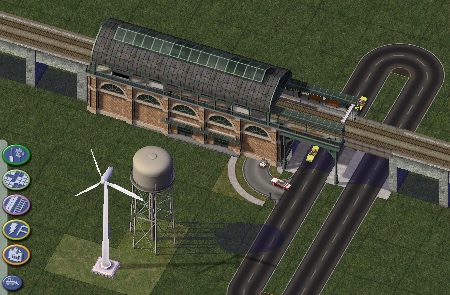
The entire combo of Rail over Street, and any other viaduct pieces hiding under station overhangs, can be revealed by turning on the Water Pipe feature, which reveals the station plop tiles as dark blue, but makes the station building invisible.
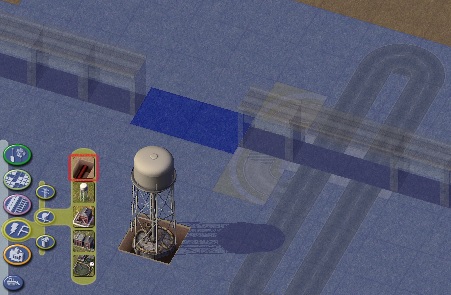
Maxis orthogonal raised stations
In the Build Rails menu
- Monorail Station
In the Miscellaneous Transportation menu
- Elevated Rail Station
Diagonal raised stations
Construction of diagonal stations generally involves use of the NAM Disconnect tool, to remove the two pieces of elevated network where the 1x2 station plop goes.
In most cases, after plopping the station in that 1x2 spot, you then activate the station by dragging the relevant network orthogonally (not diagonally) through those same two tiles.
In the Build Rails menu
- Modern Viaduct Rail Station
- Victorian Viaduct Rail Station (diagonal)
- Viaduct Rail Station, Diagonal (Morifari)
- Modern Diagonal Monorail Station
- Monorail Station, Diagonal (Morifari)
- Diagonal High Speed Rail Station (modern)
In the Miscellaneous Transportation menu
- Modern Diagonal Elevated Rail Station
- Elevated Rail Station, Diagonal (Victorian style)
- Elevated Rail Station, Diagonal (Morifari)
The Diagonal Tram Station is a one-of-a-kind, being the only diagonal station at ground level which is not a dual networking piece. The Tram network, being an override network, can be dragged into the station, but not through the station. You can also link this station up using the Tram puzzle pieces.
Dual networking stations
Plopping of dual networking stations generally requires use of the NAM Disconnector tool, to remove the exact tiles where the dual networking station is to be placed.
In the Miscellaneous Transportation menu
- Simple Tram Stop on Street
- SFBT Tram Stop on Road 1x1
- SFBT Tram Stop on Road 1x2
- SFBT Tram Stop on Road 1x3
- Diagonal Tram-Avenue Station
- Straight Tram-Avenue Station
- Overhanging El Rail over Road Station
- El Rail over Road (other side)
- Madison-Wells Station
- Ashland Station
- Morgan-Lake Elevated Rail Station
Subway
About 75% of the NAM stations have an inbuilt Subway feature. To activate the subway, you need only connect up a subway route to the one station tile that shows up as a special tile in the subway view.
Keep in mind that subways are the most expensive network in the game. Road and rail, light rail, and even monorail, are all much cheaper than subway.
Maxis Subway
In the Miscellaneous Transportation menu
- Subway Station
Mass Transit Transitions
In the Miscellaneous Transportation menu
- SFBT Subway-Tram Transition
- Tram in Road to Subway/URail Transition
- Tram in Ave to Subway/URail Transition
- Subway to Underground Rail Connector - In "Road", "T-Road" and "Ped Mall" flavours.
Maxis transitions
In the Miscellaneous Transportation menu
- Subway-to-Elevated Transition